

Okay, so I love Pinterest. Emma introduced me to it about a year or so ago, and I've been hooked ever since.
I've got around 45 different boards and a little over 2000 pins. I'm a very visual person, and a terrible neat freak (organization makes me feel warm and fuzzy), so Pinterest is a perfect way for me to sort out my thoughts into set spaces.
A lot of times, I forget that most people don't use Pinterest like I do. I don't know where I got the idea, but I started using Pinterest as a way to make writing that much easier for me. How is this possible? I'm about to show you.
 Step 1: Create a "Novel Inspiration" Board
I split up my "novel inspiration" board into three sub-boards (because organization): Prompts, Plot Bunnies, and Pretty Pictures, Setting the Scene, and Charries.
My Prompts, Plotbunnies, and Pretty Pictures (PPP for short?) is exactly what it sounds like. If I come across an interesting picture like this one (--->) that sparks an idea, I pin it there. If I find a line of dialogue that I love but don't have a storyboard that fits it, I pin it there.
In my Setting the Scene board, I pin landscapes, buildings, cityscapes, or anything else that I could set future novels (or scenes of future novels) in. If you scroll through that board, you'll find everything from steampunk bars to old dilapidated churches.
Lastly, on my Charries board, I pin pictures of people who I think could eventually become characters in future projects. I like to try and find pins where the subjects seem like they have depth (if you look through my board, you'll see what I mean).
Step 2: Create a Storyboard
Next, create what I like to call a Storyboard. Storyboards are boards that are dedicated to a specific ideas. Go take another look at your Novel Inspiration board(s). Do any of those pins fit the story of the Storyboard that you just created?
If so, move them. If you hover over the pin you want to move, there will be a pencil icon in the top right-hand side. Click on that and it will take you into an editing menu where you can change the board that that pin is pinned to.
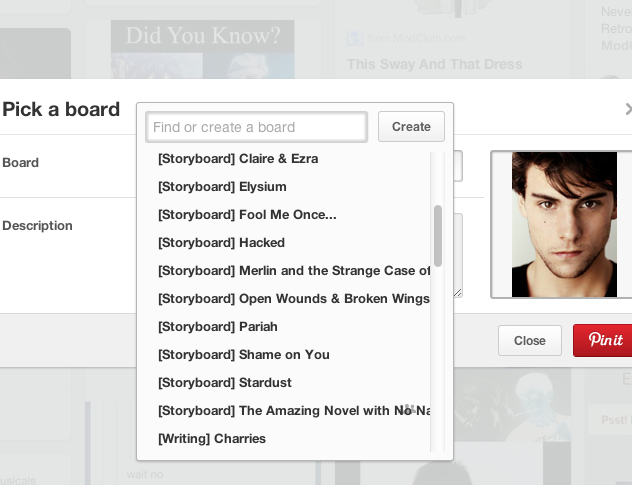 (BONUS) Tip 1: Brackets Are Your Friend
If you'd like to take your organization a step further, try this cool little trick I found.
If you put [Storyboard], or [Writing] before the name of your board, it will clump all your bracketed boards together like so.
As you can see, I've put [Storyboard] before all my storyboards and when I open the drop down menu for a pen, my writing boards are the first I see.
This is because when Pinterest shows you the boards you can pin to, it shows you them in alphabetical order. According to Pinterest's sorting system, brackets are alphabetically first. This isn't true of the mobile version, though I don't know why. If you use the [Storyboard] trick, bracket boards will end up at the bottom on the mobile version. Either way, all your boards will be easy to find.
Step 3: Get pinning!
At first it might be kind of hard finding writing pins. Searching terms like 'novel inspiration', 'character inspiration', or 'writing inspiration' will get you some good results. Alternatively, you can follow some of my writing boards such as [Writing] Charries, [Writing] Prompts, Plot Bunnies, and Pretty Pictures, or [Storyboard] Stardust.
I hoped this post has helped you get started, or continuing, on using Pinterest as writers. I want to know, how do you guys use Pinterest? Leave me a quick comment below.
 |
| Happy pinning! |


